
Ever since Digg opened its API, talented programmers have built a ton of tools that utilize Digg. Some of these tools monitor upcoming and popular stories. Others tell you about your account statistics and your circle of friends. Yet others allow users to browse stories, videos, and pictures in very unique and flashy ways. Here are twenty-nine tools, with some being lesser known than others, but all of them having some pretty significant purpose in the life of a Digger.
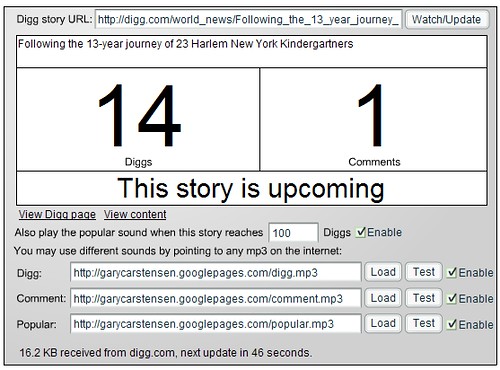
1. diggwatcher is a simple application built in Flash that runs in the background and monitors a single Digg story of your choosing. You can receive sound alerts when you get new Diggs, comments, and when your story becomes popular. The script refreshes every 60 seconds.
2. The Digg Noise Filter is a tool that will let you watch upcoming stories before they become popular… that’s if you don’t want to use the regular Digg upcoming tool. (Developed by Russ Jones)

3. Digg Entourage was also developed by Russ Jones and shows you who is in your Digg social circle by avatar and also in table format (number of stories Dugg, percentage of stories Dugg, and whether they’re your friend or fan):


4. Digg comment viewer lets you see your recent Digg comments, their rankings, and you can easily navigate to your friends’ comments. You can also have it auto-update every 60 seconds.

5. Digg CommentSpy is based on a similar concept and lets you see the most recent live comments on Digg. (Developed by Alex Bosworth)

6. TINC – or Who’s Digging You? is another Alex Bosworth Digg application that lets you see who is digging your stories.

7. Digg Charts shows the most popular stories in a table format, followed by a pie graph format and a graph that shows the progression of story popularity over time.

8. Digg Alerter is a great tool for Windows users that sits in the system tray and informs you about your most recent Digg submissions (or those of another user). You can see if your submission was popular or if it’s still “upcoming.”
First, you can choose your desired username:

Then, you can see (and hear) the tool in action when there’s activity on your recent submissions:

9. Digg Wordweb allows users to visualize the most popular keywords in a Digg submission and related stories.

10. Digg Expose displays thumbnails of all recently Dugg stories:

11. DiggCity allows you to view the most recently popular 10 stories in a city format. Each stick figure represents a Digg user and the buildings grow as more people Digg the stories and run into the buildings. If you keep this running for awhile, you’ll have very tall buildings.

12. Smart Digg Button is an excellent Firefox extension that adds a “Digg This” button to the bottom of your browser when the story has not been submitted. If the story has been submitted, you will see how many Diggs it has. This is a great and handy tool for those of us who submit a story only to find out that it’s already been submitted. For those of us looking for high quality stories to submit, this button is a huge timesaver and I wish I picked it up earlier.
This is what it looks like when you still have yet to submit the site to Digg:

And this is what happens once you do:

13. Digg Pics addresses the problem that Digg has as it is still lacking a picture section. Cadu de Castro Alves created this to let you filter through promoted or upcoming stories that include (and are labeled with) pictures.

14. Diggtris is a Tetris game based on recently dugg stories. It’s actually quite fun and addictive, though what’s up with those crazy shapes?!

15. Duggback is a tool that allows you to view cached copies of pages of Digg stories that may have been taken down due to the Digg effect.

16. What about widgets? Diggest allows you to integrate Digg into your own blog or website by taking videos off of Digg and putting them into a continuous channel.

17. Similarly, the same author has built the Digg widget that shows the recent popular stories in a widget that you can put on your site.

18. Which Stories are Popular on Digg? shows which domains are most popular on Digg. While it could be more useful if it listed the domains in order of popularity, nonetheless, it’s a pretty cool list.

MANY OF my favorite Digg tools were built by Brian Shaler. I happen to know that he still has more Digg applications up his sleeve, but here are his Digg applications as of late:
19. Wheel of Upcoming is Brian’s Digg API contest entry. It allows you to visualize the upcoming stories in a particular topic and you can then spin the wheel to see each story’s details.
First, select a topic:

Then, spin the wheel and mouse over the story:

20. Digg Heat Map allows you to visualize the Digg community as a universe with the most popular Digg members appearing to be bright stars in the sky and the newest members to be in the center of the universe. You can choose a username and then see how many friends and fans the user has.

21. Digg Friends Venn Diagram allows you to see who has befriended a particular user of your choosing, who the user has befriended, and mutual friends in a Venn diagram display:

22. Digg Radar is yet another supercool Brian Shaler creation that allows you to envision the Digg community like a universe, with the newest members at the corners of the galaxy and the oldest members in the center of the galaxy. As thumbs-ups appear, you can mouse over them to see which users have been most recently active on Digg and who have Dugg a story.

23. The Map of Digg Friendship was the original concept that turned into Digg Radar. It allows you to see the number of friends and fans that you have and where you are located on the Digg map, with the oldest members being placed in the center of the galaxy.

24. Digg Status allows you to view different statistics for a particular Digg user. I chose one of the oldest Digg users for sake of illustration. Statistics include age of account, total stories Dugg, average number of stories Dugg per month, total stories commented on (as well as a monthly average), total stories submitted (and monthly average), stories promoted to the front page, number of profile views, number of friends, and number of fans.

Some Digg tools require Apollo from Adobe. Unfortunately, most (if not all) of these applications do not run under the newest version of Apollo (air_b1_win_061107.exe), so you can try downloading AIR Alpha instead. These applications are:
25. DiggGraphr Desktop: A desktop installation that will show you Digg stories in treemap format. Each section is color-coded and you can drill down and see stories that would interest you the most (e.g. Tech News, Gadgets, etc.) There happens to be a live DiggGraphr too. (Developed by Arpit Mathur)

26. D’Lite is a “miniature” version of Digg, where you can view recent popular Diggs, its description, the submitter, the number of comments, and the number of Diggs, among other very cool information.

27. Digg Watch is also a mini Digg, allowing you to view recently popular stories and see when the story was submitted/promoted and the number of Diggs/comments it has.

28. Mini Digg is a pretty cool application that shows both Digg newly popular stories, which you can filter by section, and a tracker for particular users to see their activity in Diggs and comments.
This is what the reader looks like:

This is what the tracker looks like:

(As you can tell, I Digg a lot of stories, and I comment a little bit too.)
29. Digg Top is another Adobe AIR application (though it works with the beta version of AIR, not the alpha version as linked earlier in this article). It allows you to see newly popular stories in a variety of formats. One of the better features is the ability to load pics.
You can select the representation of the Digg sections you would like to view:

All News is displayed below. My screenshot includes me performing a mouseover so that it shows the full length of the headline for another story.

If you want to see the image within the application, just click “Load Image” and here you go:

And you can also watch videos in the built-in player:

That’s all. Twenty-nine Digg API applications… for now. I’m sure I’ll have more to report on later. If you know of any others, please add them to the comments! 🙂




Awesome! Bookmarked. Thanks Tamar for about a month’s work. Off playing with a few of those toys …
Enjoy. 🙂
That’s pretty sweet Tamar. How many of these do you use personally?
Depends on what I’m seeking out. On a consistent basis, I use the Smart Digg Button and Digg Alerter. Some are just for fun and games rather than really to be used regularly — but they’re enjoyable.
My, it pays to know the right people! I took up 20% of the list! 😉
Either that, or it’s a sign that I need to go outside more often..
I missed out on some like Digg city, thanks 🙂
Those city visualizations are extremely cool. That domain one is particularly awesome, too, though I agree – it’d be 10x better if they listed all the domains sorted by popularity 🙂
Thanks for putting together the list!
great summary! much more than the api finalists revealed. another experimental contribution to the contest was diggtrees: http://i.document.m05.de/?p=318
Hey Tamar, don’t forget my digg comment stalker @ http://diggcomments.headzoo.com, which has been up for nearly a year. Long before the API.. and for most of the time in violation of Digg’s TOS 🙂 Now it uses the API though, so it’s all good.
Sean: thanks for the heads up. Will definitely go in my next review. 🙂
I recently made a version of Digg Mobile (mainly for myself) that can be viewed on a pda/mobile. It shows popular stories in the All, Tech, or World/Business sections (the only ones I read :P) It also has basic functionality to show first 5 comments of any digg story, as to not overload the mobile processor with rendering loads of comments (lol).
Anyway, it can be found here: http://www.mrkryptic.com/diggmobile/
I am also using digg plugin for my site.
Very thorough summary, thanks!
I’ve already bookmarked a half dozen.
Nice Read….Some of them are really handy!
Nice list!
Thanks for the referer.
Cadu: I like your program. But make it better. 😉
digging digg never gets better with this post. worth a digg.
Love it! – Great job Tamar!
(There goes the rest of my day)
Wow, great effort for collecting all these tools writing this list.
Some of them are very useful.
Now, since Stumble Upon is gaining more and more traction, I’m waiting for a similar list for SU 🙂
Yohay: StumbleUpon needs to release an API, and when they do, you bet I’ll be happy to provide you with a list 🙂
Wicked awesome list!
You rock.
Another app:
http://digg.com/software/Digg_revealed
I’ve been dabbling with the Digg API and it’s pretty good.
So far I’ve built…
http://www.duggornot.com
…which allows users to check how their Digg story submissions are doing.
And…
http://www.duggornot.com/comment_reader.html
… to see how their comments are doing. I plan to integrate them both soon.
They’re still in early development but I’ve learnt a lot about the Digg API in the mean time.
Paul, cool. Thanks for the info. I’ll be sure to profile it in a later update. 🙂
Fantastic list. I did something similar for Facebook recently.
Jamie
diggTraitor – Identify the ‘unDiggly Fan’. Based on the Digg API, diggTraitor is windows-based desktop tool to ‘Identify the unDiggly Fans’. It’s a fun tool developed by me, to just explore the digg API and look at a funny side of it. Sort out fans who do not Digg your ‘most vaunted’ stories! Find it here:
http://virtual-view.blogspot.com/2007/08/diggtraitor-identify-fans-not-digging.html
I’m a loser that doesn’t read old submissions. Thank you for throwing this at me, you listed some incredibly useful tools that I’m already playing with. =) Tamar rocks. End of story.
Wow, great tools here, Some of them like the digg radar are just kind of fun to look at but others might actually provide some small business help. Thanks for the list!
One Large Thank YOU very much for this amazing list of Digg tools! I’ve been so desperately seeking the way of organizing my Digging experience. Thank you, again!
Thanks for this great list. Although some sites such as diggcity cannot be accessed, the pictures and description can describe them clearly.
well, it *has* been 5 years. 😉