Digital Marketing Specialist, Social Media Consultant,
and Tech Geek at Heart

Home >

Posts tagged as:

tools

Social Media Strategy from A to Z

May 28, 2010

Social media might be old. It might even be a dead buzzword. That’s why you need to paint a picture that’s more meaningful and encompasses what “social media” as a label really is.

Some of us have been thrust into social media simply because the online landscape showed potential for online conversations. Others have been there for over a decade. Regardless of the many years of experience you have in the online space, the ideas behind social media and social media marketing are applicable to everyone. Let’s take a look at some lessons, takeaways, and tips.

Always be Listening. Social media rocks because it’s one of the most amazing tools for “free” market research. Your investment is merely that of time. Take the time to hear what people are saying about your business. If you’re the frugal type, take advantage of the free alerts from Google, YackTrack, Social Mention, BackType (which gives you alerts from blog/article comments, which other services do not include), and Trackur.

Read the full article →

29 Super Awesome Tools Built on the Digg API

July 11, 2007

Ever since Digg opened its API, talented programmers have built a ton of tools that utilize Digg. Some of these tools monitor upcoming and popular stories. Others tell you about your account statistics and your circle of friends. Yet others allow users to browse stories, videos, and pictures in very unique and flashy ways. Here are twenty-nine tools, with some being lesser known than others, but all of them having some pretty significant purpose in the life of a Digger.

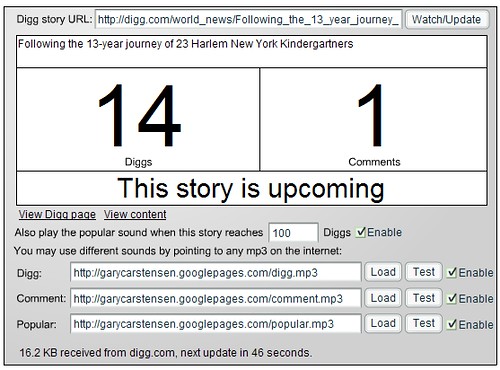
1. diggwatcher is a simple application built in Flash that runs in the background and monitors a single Digg story of your choosing. You can receive sound alerts when you get new Diggs, comments, and when your story becomes popular. The script refreshes every 60 seconds.

diggwatcher

2. The Digg Noise Filter is a tool that will let you watch upcoming stories before they become popular… that’s if you don’t want to use the regular Digg upcoming tool. (Developed by Russ Jones)

Digg Noisefilter

3. Digg Entourage was also developed by Russ Jones and shows you who is in your Digg social circle by avatar and also in table format (number of stories Dugg, percentage of stories Dugg, and whether they’re your friend or fan):

Read the full article →

Some of my Favorite Free SEO and Social Networking (Blog Rank) Tools

November 16, 2006

Some of the best things in life are free. I am thankful to those who have shared wonderful tools with me and I would like to share them with others too.

A few of these are new tools. Some are old and well-known. I hope you enjoy them as much as I do. :)

SEO Tools

  • SEO for Firefox: An excellent Firefox addon that provides users market data from Google and Yahoo search results, including PR, age of domain, links from external pages (and types), type of domain, Technorati data, Alexa ranking, DMOZ listing, number of cached pages, Bloglines subscriptions, Yahoo directory listing, and whois information.
  • Page Strength SEO Tool: This SEOmoz offering calculates the value and visibility of your page and incorporates links pointing to the URL/domain, Google search results position, age of domain, links from .edu and .gov sites, Alexa rank, number of results in Google that include the domain, internal link percentage, Technorati links, del.icio.us links, DMOZ listing, Wikipedia reference, and Google PR.
Read the full article →

Web Development Made Easier: See Your Results on a Bunch of Browsers

October 28, 2006

Browsershots.org gives web developers screenshots of their sites across 3 operating systems (Linux, Windows, and MacOS) and a bunch of different browsers:

Browsershots

Don’t have MSIE 5.5 anymore — but your client does? Have no fear, this tool will show you what your site looks like on that browser. You can further limit your requests to pages with Flash, Javascript, and more.

The service will queue your request (among about 200 others) and you can specify a time period for your browser screenshots to process. The default is 30 minutes, after which the process in the queue is terminated and your screenshots are lost. Therefore, unless absolutely necessary, it’s advisable not to run a job using all the browsers listed — uncheck a few.

Read the full article →